10 Questions to Ask About Medical Alert Systems
Ten questions to ask about medical alert systems before you sign: pricing after promotions, contract traps, fall detection limits and night coverage.
In a study of real falls in older adults' homes, 97% of worn emergency buttons went unpressed. Not unworn — unpressed, while the person was on the floor. That one number should reorder the questions to ask about medical alert systems: fewer about features, more about what happens when the button model fails.
The questions to ask about medical alert systems that brochures skip
The category exists for a real reason. The CDC counts one in four adults over 65 falling every year, and Tinetti's New England Journal of Medicine work found that most people who fall are unable to get up without help — and that lying unhelped for more than an hour makes everything that follows worse. A device that shortens that wait earns its fee.
So the ten questions below are not about whether to buy. They test whether one specific system, worn by one specific person, in one specific house, will do the job on the day it matters. Questions 2, 3 and 7 protect your wallet. Questions 1, 6 and 10 decide whether help actually arrives — and if those three go badly, the last section of this page is for you.
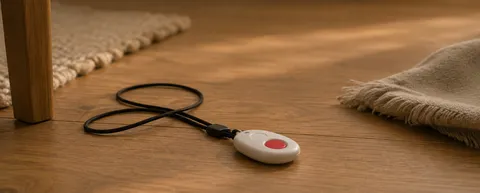
1. Will my parent actually wear it?
Every pendant demo assumes a pressed button. Real falls break that assumption two ways. Some people are unable to press — dazed, pinned, an arm trapped underneath. Many others won't, because pressing means an ambulance, a fuss, and an admission they are not ready to make. That is where the 97% comes from.
A daughter we spoke with found her mother's pendant looped over the bedpost. First the reason was the shower, then the sweater it snagged on. By her third visit it simply lived there. Ask the person, not the salesperson: would you wear this in bed, in the shower, in the garden? If the honest answer is no, a discount doesn't fix it. The format is wrong, not the price.
2. What is the real monthly price after the promo ends?
Monitored systems typically run $25–45 a month as of mid-2026 — a rate advertised well below that band is usually a promo, so check what it renews at before you sign. Then do the arithmetic the ad never does: $35 a month is $420 a year, and families keep these systems for years, not months.
Ask for two totals in one email: everything you pay in year one — device, activation, shipping, fall detection — and everything you pay in year two at the ordinary rate. A provider that keeps those numbers on the phone instead of on paper is telling you which one grows.
3. How long is the contract, and what does cancellation actually take?
Month-to-month is the norm now, but not the rule — Life Alert became famous partly for its three-year contracts. Name the three scenarios out loud on the sales call: your parent moves to assisted living mid-term, your parent dies mid-term, you cancel because the device sat unworn. Who refunds what, and who pays return shipping?
Then read the order form itself, not the salesperson's summary of it. The order form is the product. Note whether "cancel" means one phone call or written notice thirty days ahead, and keep the return tracking number when the box goes back.
4. Does fall detection cost extra, and how does it actually trigger?
Usually around $10 a month on top of the base fee. What that buys is an accelerometer watching for the signature of a classic fall: sudden acceleration, hard stop, changed orientation. Trip over a rug and go down hard, and it fires.
But many real falls have no signature. Knees fold slowly at the kitchen counter. Someone lowers themselves onto a step and can't rise again. A body slides off the edge of the bed. No impact, no trigger. Every major provider's own fine print says automatic fall detection can't detect every fall — believe the fine print over the ad, and buy it as a backup for the fall nobody could press through, not as the whole plan.
5. Who receives the alert — a call center or my family?
Two models. A monitoring center is what most of the monthly fee buys: staffed seats, day and night, whose only job is to answer. Ask for the average answer time in seconds, and ask whether the center is UL-listed or TMA Five Diamond certified — those are audited standards, not slogans.
The family-first model routes alerts to your phone instead. It's cheaper, and the responder knows the house and the person. It also means the system is only as awake as you are: silent mode in a meeting, a flight, a dead battery on your end. Ask what the escalation chain is when contact one doesn't pick up — and what sits at the end of the chain when nobody does.
6. What happens at night and in the shower?
Walk the vendor through two rooms. The bedroom: the pendant is on its charger, and your mother gets up in the dark to reach the toilet. In that moment the system is a plastic box on a dresser. Ask what — if anything — still raises an alert while the device charges.
The bathroom: wet tile, hard edges, and the one room where pendants get taken off. "Waterproof" is a word; IPX7 is a rating. Ask for the rating of the exact model, then ask the harder question underneath it: will she actually wear it in the shower? Question 1 never really goes away.
7. What are all the fees?
The sticker price is the beginning of the bill. Ask for every line by name: activation, "processing," equipment rental versus purchase, shipping both directions, restocking on returns, a lost-pendant replacement, a second user's button, fall detection. A $27 sticker plus fall detection plus a spouse button reaches the top of that $25–45 band fast.
The single most useful document to request is a sample final invoice — what a customer who cancels after fourteen months actually pays, end to end. If the provider has never produced one, you're about to be the test case.
8. Does it work outside the home?
A base-station system covers the house and stops near the property line — its range is measured in feet, not miles. Mobile GPS units go wherever the person goes, cost more, and need regular charging, which loops straight back to question 1: a unit on a charger is a unit not worn.
So map the actual week before choosing. Church on Sunday, the grocery store, the garden, the mailbox. Someone who leaves the house daily needs the mobile option. Someone who mostly stays home is paying every month for GPS that never leaves the hallway. Buy for the routine that exists, not the one in the ad.
9. What happens if the power goes out or Wi-Fi drops?
Every system stands on a stack: wall power, then a landline, a cellular network, or your router. Ask for the base station's battery backup in hours — a real spec sheet has that number — and which link in the stack the alert actually travels on.
Then ask the question that separates working systems from decorative ones: when the connection dies, who finds out, and how fast? If the answer is "nobody, until someone tests it," you own a device that fails silently — and a silent failure looks exactly like a quiet, safe day.
10. What's the false-alarm story?
A pendant dropped on tile fires. A sleeper rolling onto the button fires. False alarms happen on every system; the question is what happens next. Ask three things: how the wearer cancels an accidental alert, whether the center attempts voice contact before dispatching, and who pays when an ambulance arrives at a false alarm.
Then watch for the second-order damage. After the second embarrassing dispatch, the pendant migrates to a shelf — and you're back at zero while still paying $35 a month. A vendor who tells you false alarms "don't happen" has answered a different question: how much to trust everything else they've said.
If several answers worry you
Tally where the answers went wrong. Bad answers to 2, 3 and 7 mean a pricing problem — shop a different pendant brand. Bad answers to 1, 6 and 10 mean a format problem: the weak points are the wearing, the charging and the pressing, and no pendant brand removes them. Only a different format does.
That failure is why we built OdeCare. Instead of a button, camera-free radar, door and climate sensors go into the rooms where the day actually happens — bedroom, bathroom, kitchen — and read the rhythm of the home: when the night settles, when the morning starts, how the day moves. Nothing to wear, nothing to charge, nothing to remember to press. When the rhythm breaks, the app alerts the family; where partner monitoring is included, an operator calls the resident, then the caregiver, then local emergency services under the agreed plan. Cancel anytime.
Three things OdeCare doesn't do, so nothing surprises you later. It doesn't leave the house — errands and travel need a mobile pendant alongside it. It has no cameras or microphones anywhere, so you see patterns, never video. And it doesn't diagnose — it flags what's off and gets a human moving.
For the wider picture, our guide to elderly monitoring systems compares pendants, cameras and sensors with real costs; if you're weighing the big pendant brands directly, see Life Alert alternatives; and if automatic fall detection is your deciding feature, fall detection devices compared digs into what triggers and what gets missed. Whichever way you go, go with these ten answers in hand.